
Le Vampire in a mobile browser on Android and iPhone
Le Vampire opens straight in your phone's browser: a 6×5 cluster grid, stakes from €0.05 to €2,000, and no installer anywhere in the process.
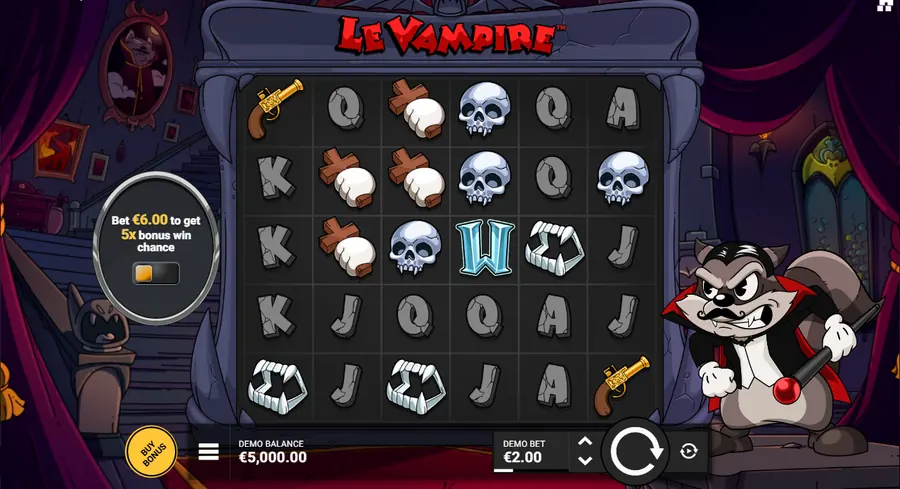
Le Vampire is a browser game, so Android and iPhone owners open the operator's site and play in the tab, with nothing to install and no file to download. The 6×5 cluster grid appears within seconds; after that you pick the demo or the real-money version, and the demo asks for no deposit. What follows is the launch order on both platforms, what your browser has to handle, and how the bonus buys behave when the screen is only a phone wide.
📑 Table of contents
Do you need to download Le Vampire
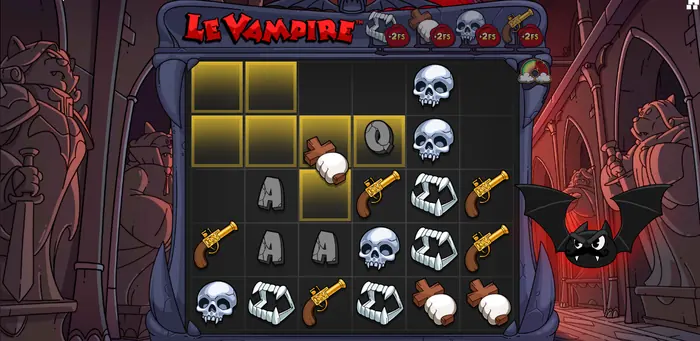
There is no Le Vampire installer. Hacksaw Gaming serves the game from its own servers and it runs inside the browser on the operator's domain, so a phone shows the same 6×5 grid, the same clusters of five or more connected symbols, Super Cascades, Golden Squares, coins and clovers you would see on a desktop. A search for a Le Vampire download comes down to one decision: where to play. Nothing gets installed and everything happens inside the tab.
Which build you land on depends on the operator. In the configuration the game rules describe, RTP sits at 96.36%, the maximum win is 15,000× your bet, and normal stakes run from €0.05 to €2,000. Hacksaw Gaming also publishes 97%, 96%, 94%, 92% and 86% configurations, so the numbers are worth comparing before you register. The full review of Le Vampire and its bonuses covers all three bonus games in detail.
Where the slot appears at all comes down to your country and the operator's rules. Some sites open the demo instantly, others want verification and a deposit first, and a few carry no Le Vampire in their catalogue whatsoever. Checking takes a minute: open the games lobby and search the title.
Launching the game on Android and iPhone
- Open Chrome on Android or Safari on iPhone and head straight for the operator's official domain, skipping promotional links in ads.
- Find Le Vampire in the games lobby or through the title search.
- Choose a mode: the demo for testing the mechanics, or the real-money game once you are signed in.
- Wait for the grid to load. Heavy animations and sound arrive after the start, so the first few seconds can look almost empty.
- For one-tap launching, send the page to your home screen from the browser menu: in Chrome it is Add to Home screen, in Safari Add to Home Screen. The icon opens the game without an address bar, though it does not count as an app in any store.
No app file sits in Google Play or the App Store; what you get is a bookmark pointing at the same mobile interface. Installation only ever happens through the operator's site.
Checking compatibility
Le Vampire loads as a web app, so its requirements resemble browser requirements more than the hardware needs of a native mobile game.
- A current browser: Chrome or Safari in the latest available version. On outdated Android builds the cascade sound and animation sometimes refuse to start at all.
- JavaScript enabled. Without it the grid stays empty or shows a load error.
- A stable connection: Wi-Fi or mobile data with a good signal. A drop during the cascades cuts the payout animation short, though the round itself still counts.
- Some free memory. The browser wants several dozen megabytes for its cache, and below that the animation starts to stutter.
Exact system requirements are best confirmed against the operator's recommendations, since they publish the list of supported operating systems and browsers and they decide which build carries which RTP.
Permissions and safe access
The places offering an installer are mostly the places where you do not need one. APKs, mods and configuration profiles from unknown sites skip the app store's checks and gain access to your device data.
- Skip APKs and config files hosted on third-party sites.
- Leave device protection alone (Unknown sources, Play Protect, antivirus) even when a site claims the game will not run without it. The slot needs none of that.
- If an operator does offer a casino app, take it from the operator's own site or an official store listing, and check the publisher name in the app card.
- Read the address bar before you pay: fake card entry forms tend to arrive in chats and newsletters.
Manual updates are pointless here as well. The current build is pulled from the operator's server on every launch, so there is no patch to download.
The mobile slot interface
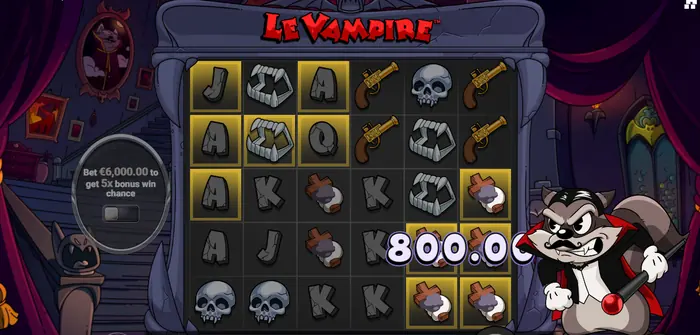
On a phone Le Vampire keeps its familiar layout. The 6×5 grid takes up most of the screen, a panel below it holds the balance, the bet and the result of the last round, and the buttons are enlarged and moved under your thumb. In landscape the figures in the lower panel read larger, while in portrait you have to zoom in.
One control sits apart from the rest, on the left of the reels: a round panel with a toggle for a raised bet that buys a fivefold chance of landing a bonus round. On a touchscreen that toggle is easy to catch by accident, and the real stake ends up higher than the one you planned.
Give the first launch a minute and check whether the bet amount reads without zooming. In portrait the small digits need squinting at, and a mistake in the stake size takes a while to notice.
Touch controls
Basic actions take one tap. Tapping the round button spins the reels, tapping again mid-animation hurries the result along, the arrows beside the Bet field change the stake, and the menu button opens the help, the paytable and the settings.
Worth learning the layout in demo mode first. Operators differ, and so does the arrangement at different screen widths, so a blind thumb tends to land on the neighbouring control. The help panel opens over the grid without resetting the round in progress.
The keyboard shortcuts listed in the game rules (Shift+S for sound, Shift+P for the paytable, Shift+B for the bonus menu) work only in the desktop browser build. On a touchscreen the on-screen buttons take their place.
Screen rotation and fullscreen
In portrait the grid compresses, and small symbols such as coins, clovers and the Rainbow become hard to make out. Turning the phone into landscape usually solves it: the grid stretches across the width and the bet panel drops lower, staying within thumb reach.
Fullscreen can be reached two ways, through the browser or through the game itself. On an iPhone in Safari it is the expand button in the address bar or a double tap on the grid; on Android in Chrome it comes from the menu with the expand icon. The couple of centimetres reclaimed below the bet panel are noticeable on a small screen.
If your system keeps rotating the screen and landscape feels awkward, portrait works fine as well. The game stays fully controllable, you just hold the phone with two hands, and you take a pause before any large bonus purchase.
Free play mode on mobile
The demo opens on the same operator page and shows the same rules, stakes and mechanics as the real-money game; only the balance is fake. On a phone that is a convenient way to gauge load speed, check how legible the interface is and see whether the device can handle the cascade animation.
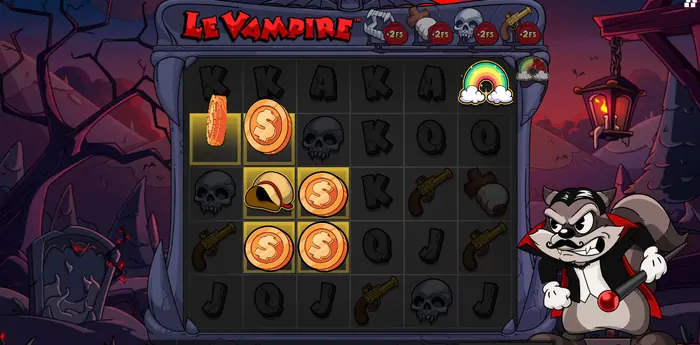
The bonus spin screenshot shows what the mobile build keeps: the +2 FS counters on symbol types, coins carrying different values, and the rainbow that reveals golden squares. You can take a calm look at Epic Rainbow, Gold Clover and Pot of Gold without risking money.
Virtual wins in the demo carry no monetary value. They cannot be withdrawn, transferred to a card or swapped for operator bonus points, and demo payouts do not stand in for real ones. If you want a free version with a wider selection of games, there is a page where you can try the free demo mode.
Stakes and bonuses on a small screen
The amount changes with the arrows beside the Bet field, and on a narrow screen you can brush the neighbouring control and leave €0.05 for a sum you never intended. Glance at the stake field before every round, and all the more so before buying a bonus. A second trap is a value left over from an earlier autoplay session: it is worth confirming that the Bet field holds the amount you actually chose.
| Mode | Cost | Mode RTP | Volatility |
|---|---|---|---|
| BonusHunt FeatureSpins | 3× | 96.31% | low |
| Rainbow Bite FeatureSpins | 75× | 96.12% | low |
| Rainbow Epic Drop FeatureSpins | 500× | 96.36% | very high |
| Coffin Break | 60× | 96.25% | low |
| Love at First Bite | 250× | 96.26% | low |
Prices are set in bet multipliers. At a €2,000 stake, buying Coffin Break costs €120,000 and Rainbow Epic Drop FeatureSpins costs €1,000,000. That figure is the entry price for the mode, not a guaranteed payout: the FeatureSpins modes guarantee the feature you picked, never the size of the win.
Before confirming a purchase, three numbers deserve a check on screen: your current bet, the cost of the mode and the balance you have left. A confirmation takes a couple of taps on a touchscreen, which makes rushing the most expensive mistake of all. Playing at a casino on a mobile device gets its own page.
Paytable and feature rules
The paytable opens from the menu on a phone, and the values have to be read in small print. Pinching to zoom the page is more practical, or opening the table on a desktop in the same browser. On mobile it is enough to grasp the top multiplier range, since it shows what a large payout is built from.
| Symbols | 5 | 6-7 | 8-9 | 10-11 | 12-13 | 14+ |
|---|---|---|---|---|---|---|
| Skull, pistol | 0.6× | 1× | 2× | 5× | 20× | 100× |
| Epic skull, Epic pistol | 1.2× | 2× | 4× | 10× | 40× | 200× |
Every figure in that table is a bet multiplier. A symbol multiplier and the overall win cap measure different things: 15,000× is the ceiling for a round or a bonus series, while a skull in one combination pays up to 100× and fangs up to 75×. Everything accumulated through the cascades rolls into the round win and still runs into that ceiling. The full table for every symbol type is collected in the Le Vampire review.
Two things about RTP are worth keeping in mind. The 96.36% figure belongs to the main version of the game and comes from simulating 10,000,000,000 rounds; bonus purchase modes have their own returns, 96.12% for Rainbow Bite and 96.26% for Love at First Bite, for instance. Main game volatility sits in the middle at 3 out of 5, while Rainbow Epic Drop FeatureSpins is very high.
The feature rules (Super Cascades, Golden Squares, Blood Squares, Rainbow, Epic Rainbow, Clover, Bag of Gold, Pot of Gold) and the conditions for landing each bonus game live in the same in-game help screen, which is convenient to open from a phone through the menu.
Notifications and autoplay
Autoplay starts with a single tap on a phone and keeps spinning without you, so its parameters are best set in advance. The advanced settings hold the number of spins, a limit on total losses for the session and a limit on a single win. The autoplay stops on its own once any of those limits is breached, and the Stop button stays highlighted for the length of the series.
Without limits set, the counter runs well past the budget you started from. On a small screen the remaining spin count is easy to miss, and the notice that the series has ended arrives only after the last round has already been played.
Turbo Play is a separate switch and runs rounds at the highest available speed. With a small stake, losses mount faster than you can read the results. Win amounts appear in large digits over the grid (800.00 in the screenshot) and cover part of the symbols, so after a large payout it is better to let the field scroll past and wait for the animation to end before setting the next bet.
If the slot runs slowly
If rounds lag, the cascade animation freezes or the sound will not switch, work through these in order.
- Check the connection: switch between Wi-Fi and mobile data, or move closer to the router.
- Update the browser to the latest version and reload the tab with the game.
- Clear the cache and temporary data for the operator's site. A full cache slows the animation noticeably.
- Close the heavy tabs: video, maps and messengers eat the phone's memory in the background.
- Sign out of your account and sign back in on the operator's official site, then open Le Vampire again.
Blocking scripts or pop-ups will not improve performance. If the game still refuses to start after all of that, contact the operator's support team, where they can check compatibility with your version of the operating system and browser.
Safety and responsible play on a smartphone
Mobile access does not cancel the usual rules. Stick to licensed platforms whose domain is easy to verify, and set a budget before the first spin rather than after it.
- Check the age and regional restrictions. Some places ask for proof of age, and in a number of countries slots are unavailable altogether.
- Set deposit and session time limits in the casino app or in the operator's settings.
- Play with money whose loss leaves your everyday life untouched.
18+. If gambling is banned where you live or causes financial trouble, keep to the free mode, which stays a safe way to learn the rules.
FAQ
Is there a Le Vampire app for my phone?
No. The provider ships no app of its own, and the game sits in the browser on a licensed operator's site, where each visit pulls the current build from the server. The practical difference is that you never update anything by hand and no store ever asks for installation permissions.
What should I check before playing on a small screen?
Read the Bet field before you spin, because the arrows that change the stake sit close to the spin button and a stray brush can leave the wrong amount in place. Then check that the numbers in the lower panel are readable without pinching to zoom; if they are not, turn the phone into landscape or stick to the demo until you get a feel for the layout.
Can the bonus buy menu be used from a phone?
Yes, and the prices are the same ones you see on desktop: a FeatureSpins mode or a direct bonus purchase costs a multiple of the current bet, from 3× for BonusHunt FeatureSpins up to 500× for Rainbow Epic Drop FeatureSpins. The purchase screen shows the bet, the price and your balance, so confirm the figures before tapping through, especially on the pricier modes.
Why does the game stutter on my phone?
Most often it is the browser rather than the slot. Update Chrome or Safari, clear the cache and temporary data for the operator's domain, close video and messenger tabs running in the background, and check whether your signal holds up. If the grid still refuses to load, the operator's support team can test your operating system and browser version against the game.